Apple Watch Guide
Capture thoughts from your wrist.
Overview
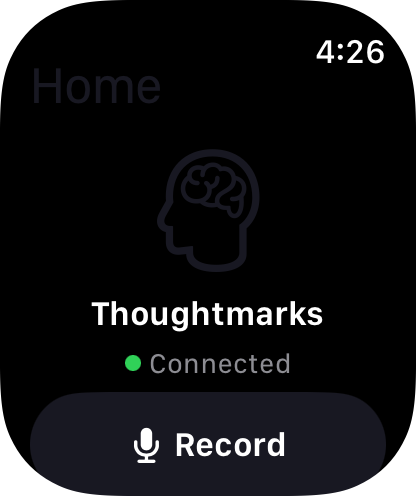
The Thoughtmarks Apple Watch app brings instant voice capture to your wrist. Record thoughts while running, cooking, or driving. Hands-free capture that seamlessly syncs with your iPhone.
Getting Started
1. Setup
- Install Thoughtmarks on your iPhone
- Open the Watch app on iPhone
- Find "Thoughtmarks" in the app list
- Tap "Install" to add to Apple Watch
- Wait for installation to complete (1-2 minutes)
Requires watchOS 10.0 or later
2. First Voice Capture
- Open Thoughtmarks on your Apple Watch
- Tap the large Record button
- Speak your thought clearly
- Tap Stop when finished
- Recording automatically syncs to iPhone
3. View Recent Thoughts
Scroll down on the main watch screen to see your recent Thoughtmarks. Tap any thought to:
- View transcription
- Play back recording
- Add tags (voice input)
- Delete recording
Features
Quick Voice Capture
Raise your wrist, tap record, speak. Done in seconds. Perfect for capturing fleeting ideas while moving.
Seamless Sync
Recordings automatically sync to iPhone via Bluetooth or WiFi. View, edit, and organize on the big screen.
Offline First
Record thoughts without iPhone nearby. Everything queues and syncs when devices reconnect. Never lose an idea.
Complications
Add Thoughtmarks complication to your watch face for one-tap access to voice recording.
Complications Setup
Adding Thoughtmarks Complication
- Press and hold your watch face
- Tap "Edit"
- Swipe to complications screen
- Tap the complication slot you want to use
- Scroll to find "Thoughtmarks"
- Select the complication style you prefer
- Press Digital Crown to save
Available Complications
- Circular: Quick tap to start recording
- Corner: Shows recent thought count
- Graphic: Large button for easy access
Troubleshooting
Watch App Not Installing
- Ensure watch is on WiFi or near iPhone
- Check available watch storage (need about 50MB)
- Restart both watch and iPhone
- Update to latest watchOS version
Voice Recording Issues
- Ensure microphone permission is enabled
- Check watch is not in silent mode
- Speak clearly 6-12 inches from watch
- Ensure sufficient watch storage
Sync Delays
- Normal sync: 5-30 seconds
- Large recordings: Up to 2 minutes
- Offline queue: Syncs when reconnected
- Force sync: Open iPhone app to trigger immediate sync
Privacy & Security
Your watch recordings are fully encrypted:
- Encrypted on watch before sync
- Encrypted in transit to iPhone
- Encrypted at rest on iPhone
- Hardware-backed encryption (Secure Enclave)
For complete privacy details, see our Privacy Policy.
Need Help?
Apple Watch specific support:
- Email: support@thoughtmarks.app
- Subject: "Apple Watch Support"
- Include: Watch model, watchOS version, and description of issue